Rebuilding My Homelab with Compose, Ruby, IPv6, and No Kubernetes
A little less than a year ago I wrote:
Everything is in shambles.
One machine is dead and probably not coming back. Services are randomly scattered amongst the survivors. My Kubernetes project is kinda-sorta paused.
This post is an addendum to that one, where I'm going to give an overview of what I've settled on, as much as one can settle in a homelab.
To recap a bit, in the previous post I had a bunch of machines that were mashed together into something resembling a coherent cluster:
hypnotoad,crushinator, and a precarious control plane VM running on a thin clientlrrr, an N150 box running Proxmoxnibbler, a piece of shit
Of those four machines, lrrr is the sole survivor.
The Problem of Nibbler
Nibbler, on television, is an adorable little three-eyed dude in Futurama that (courtesy spoiler warning, but 20 years is well past my cutoff) turns out to be a member of a hyperintelligent race of beings that can time travel and who, in fact, is the reason why Fry fell into the cryopod to start with.

nibbler, in my basement, was a machine that I had pinned a lot of hope on. It was a Lenovo M80s Gen3 SFF with an i7-12700 and DDR5 memory, picked up on eBay for what seemed like a steal (foreshadowing).
I upgraded the memory to 128GB and the storage to 3TB of NVMe with left over pocket change.
I put an HBA in it and hung a disk shelf off of it with seven 16TB drives.
It was to be the core server, the one where all the action would happen.
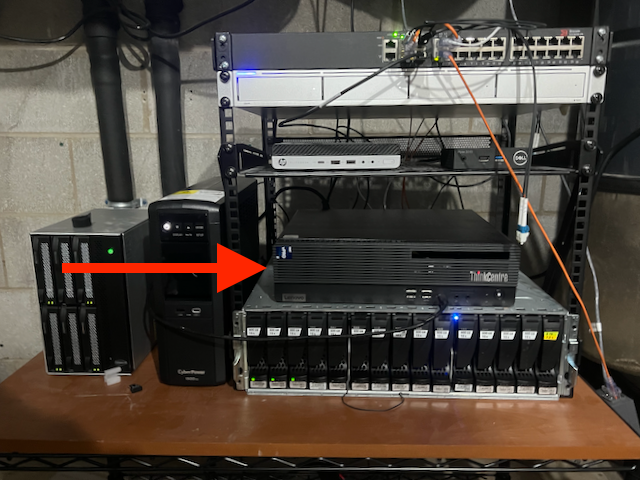
It was, as covered earlier, a piece of shit.
I'm still not quite sure what was wrong, but it was never reliable. Often it would just not come up after a reboot. Once in a while it would just forget about hardware.
On more than one occasion I or my spouse would discover that Jellyfin wouldn't play anything anymore, and I would shuffle down to the basement to attach a monitor and keyboard and discover that the entire storage disk shelf was errored out with inscrutable SAS adapter driver errors in the kernel logs.
Around the time I wrote the previous piece I put together a likely story. The eBay seller knew this machine was bad but they slapped an "eBay Certified Refurbished" label on anyway and sold it for a song to a sucker. By the time I realized this I had modified the machine so extensively I couldn't make a refund claim.
The Problem of Kubernetes
Simultaneous to the nibbler revelations I had another realization: Kubernetes is Too Hard.
I built a system that I didn't actually know how to maintain without the time or energy necessary to dig myself out of trouble.
When the machine that has more cores and memory than every other machine in the cluster combined decides to self-immolate once or twice a week it puts a huge damper on the whole experiment.
My stop-gap solution was to revert everything important back to the way things were before k8s, which was effectively just docker compose. After letting that bake for a while I decided to just roll with it.
You Know What They Say About Temporary Solutions
It's now July of 2026.
lrrr exists in much the same form as it did before.
It's still running Proxmox, but the only virtual things there are one LXC running Omada and one tiny VM that I've been using to ease myself into the agentic lifestyle.
I've also done the worst thing imaginable to the Proxmox forum trolls: I've installed Docker on the host to run core services like Home Assistant and friends.
hypnotoad and crushinator are turned off, lying in state until I need them again.
morbo is a new-to-me HP Elitedesk 800 G3 SFF that runs TrueNAS SCALE and whose entire job is to manage storage and stay out of the way and it does a great job. The end.
ord-router is a VM running at a datacenter in Chicago that happens to have direct peering with Comcast. This is the public ingress node.
nibbler is now an amalgamation of old and new parts: same memory, same storage, new gamer-style case and motherboard and processor (Ryzen 9 9900X). It also recently gained an RTX 5060ti 16GB video card for local LLM experiments.
This is the "everything else" machine. Everything that isn't critical to the house functioning as a house and the network as a network runs here.
Among other things, nibbler is where Forgejo, Minecraft, and Jellyfin and friends live, along with a bunch of other random crap.
There are also a handful of Raspberry Pi-class devices scattered around that are also deployed with this system, but they do appliance-type things: house-pi runs a Z-Wave stick and shed-pi is where the ADS-B receivers are plugged in.
Docker Compose with Extra Steps
Quirky? Yeah, let's go with quirky.
The software stack that deploys the homelab is arranged like this:
- a bunch of spicy docker compose stacks
- a handful of Ruby libraries that implement the spice
- a Rakefile to drive the libraries
- a YAML file that ties it all together
What's the spice, you ask?
- cron jobs
- secrets management
- secure defaults
- http ingress via Caddy with optional authn/authz and optional public-facing IP
- automatic certificate management via Lego
- backups
- monitoring
- dashboard
- static websites served by the ingress
- cross-stack dependency declarations
- cross-platform docker image builds
Each compose stack declares what it wants using compose extensions (i.e. fields that start with x-).
Here's a simple example:
services:
  metube:
    image: ghcr.io/alexta69/metube
    container_name: metube
    hostname: metube
    restart: unless-stopped
    x-security:
      enabled: true
    volumes:
      - media-nfs:/media
    environment:
      DOWNLOAD_DIR: /media/youtube
      HOST: '::'
    x-backup:
      enabled: false
    x-web:
      port: 8081
      auth: true
      dashboard:
        name: MeTube
        subtitle: Download YouTube Videos
        category: Media and Games

x-depends:
  - media-volume
This sets up MeTube, a little app that grabs videos from various places around the internet.
It enables the secure defaults, it declares that it doesn't need backups, and then it sets up ingress.
Here, x-web specifies the port, that it wants authentication/authorization, and that it should show up on the dashboard.
This example also illustrates the cross-stack dependencies.
It pulls in the media-volume stack which sets up the media-nfs volume.
The trick that lets all that work is that all of the stacks get smushed into one big docker-compose file at deploy time. That means I don't have to do gross things like declare external volumes or networks, it all just hangs together.
Networking Is Type Two Fun
In a normal docker compose world every container in a stack shares a bridge network. For my purposes that doesn't make sense. I don't want some random vibe-coded thing that I downloaded yesterday to be able to talk directly to lldap, for example.
Instead, I emulate what you'd get if you were deploying individual stacks: each stack gets a bridge network to itself, and containers in other stacks can join it when necessary.
The natural way to implement ingress, then, would be to have every container that serves a website join a shared ingress bridge. Again, though, that doesn't really fit what I'm going for. I want to preserve the separation between stacks so that an extruded todo list manager that gets popped doesn't threaten everything else.
My solution is deterministic IPv6:
- The fleet as a whole gets a /48 IPv6 ULA, which is similar in concept to an RFC1918 IPv4 network (ex:
10.10.10.0/24) but drawn from a vastly larger pool - Each host gets a /64 by hashing the hostname + salt for the next 16 bits
- Each stack gets a /96 by hashing the stack name + salt for the next 32 bits
- Each service gets a /128 by hashing the container name + salt for the last 32 bits
In other words:
<48 bit ULA prefix>:<16 bit host>:<32 bit stack>:<32 bit service>
Caddy runs with network_mode: host and all of the generated upstreams point at the IPv6 assigned to the containers, which works because the host naturally has access to all of the bridges.
Another weird/brave/stupid thing about my setup is that lrrr and nibbler both have ports 80 and 443 exposed to the internet over IPv6.
Caddy is set up to reject non-local traffic unless the service specifically opts in with a public: true route.
This is mostly for convenience so I don't have to set up Tailscale on mobile devices to access things like Jellyfin and the dashboard.
Oh, and Tailscale. Tailscale is so cool. Except on my iPhone which it makes very hot and drains the battery.
Tailscale is the backhaul for a few important things.
Web traffic that hits ord-router is routed to the hosts in the basement over Tailscale.
It's also how Caddy on each host talks to the central authn/authz system running on lrrr.
What Have We Learned Today
First, that I have not built a Kubernetes. Nothing about this changes at runtime so I don't need etcd or Raft or consensus of any sort. Everything is statically determined up front, with linters and tests and other nice things.
Second, the failure domains concept actually works really well in practice.
lrrr is home for critical stuff which is kept to a minimum.
nibbler is everything else that isn't a weird one-off appliance.
If nibbler goes down people are sad but not mad.
If lrrr goes down the HVAC system gets a little dumber and the LEDs we rely on to tell us the cats are outside stop working.
Finally, it's really nice to have full control over the system. For example, the other day I decided to implement that static sites via ingress thing. I didn't have to dig for a solution on some kubernetes discourse that is five years out of date and then translate it forward. I just wrote some code and made it happen. Same with the IPv6 thing. Being able to do that smoothly is a consequence of having complete control.
Oh, and also, if none of this sounds like type one fun for you then sticking with Kubernetes or one of the zillion docker compose managers that people have put together is completely valid. I see you. It's ok.
I have a sanitized public snapshot of the code that builds the whole thing on my Forgejo if you're interested.
Wanna chat about this kind of thing? Links to my socials etc are in the footer.
It's 2026 so I guess this needs to be explicit: these are artisanal, human-produced words. The machines suggested fixes for my hackneyed clichés but I didn't use any of their words.