Home Lab
Homelab Ingress With Deterministic IPv6
In my last post I talked in general about how my homelab is set up. In this piece I'm going to explore one of the more interesting aspects of the stack in more depth: my web ingress.
The canonical homelab Docker-based ingress is Caddy, Traefik, or Nginx Proxy Manager sitting on a shared Docker bridge with every other web-facing container. This is easy and understandable and also a security trap.
I wanted a harder network boundary between my stacks so I run Caddy with host networking and reach services with deterministic IPv6 addresses. I trust Caddy significantly more than I trust whatever random container I spun up most recently.
Ingress in a Nutshell
Most server software targeting hobbyists and dilettantes has a web interface.
You spin up the container, you expose port 8080, you point your browser at zaphod.local:8080 and you're done.
Except, what about HTTPS? What about nice-looking names and subdomains?
Something has to deal with that essential complexity.
Should every random container handle it?
Do you really trust the latest slop app at the top of /r/selfhosted with your DNS credentials so it can generate a certificate?
I sure don't.
There are an uncountable number of solutions in this problem space. In the past I've run nginx, Apache, Traefik, and probably more I've forgotten, but for now I've settled on Caddy.
Every stack gets its own Docker bridge network. Services only join other stack networks when they truly need to.
So, how does Caddy get at containers? It runs in host network mode. That means it can reach apps through the stacks' networks because the host inherently has routes into those bridges. No shared bridge necessary.
Deterministic IPv6
The thing that makes this trick work is deterministic IPv6.
The lab as a whole has a shared /48 ULA prefix.
For each stack, we calculate two hashes: the host name and the stack name.
Then, we fill out this formula to determine the stack's /96 prefix:
<48 bit ULA prefix>:<16 bit host>:<32 bit stack>::
Each service in a stack gets a /128 address inside that /96, and to get the final 32 bits we hash the stack name and the service name together along with tags, then fill in the formula again:
<48 bit ULA prefix>:<16 bit host>:<32 bit stack>:<32 bit service>
Here's a worked example:
ULA = IPAddr.new("2001:db8:1234::").mask(48)
hostname = "zaphod"
stack_name = "whoami"
container_name = "whoami"

# this is handwavey pseudocode
hostname_bits = SHA256(["host", hostname].join(":")).first_bits(16)
stack_bits = SHA256(["stack", stack_name].join(":")).first_bits(32)
container_bits = SHA256(["stack", stack_name, "container", container_name].join(":")).first_bits(32)

stack_prefix = ULA.to_i
stack_prefix |= hostname_bits << 64
stack_prefix |= stack_bits << 32
stack_addr = IPAddr.new(stack_prefix, Socket::AF_INET6).mask(96)
#=> IPAddr.new("2001:db8:1234:70ef:55a:c88c::")

container_addr_bits = stack_prefix
container_addr_bits |= container_bits
container_addr = IPAddr.new(container_addr_bits, Socket::AF_INET6)
#=> IPAddr.new("2001:db8:1234:70ef:55a:c88c:301d:58fe")
I need these addresses because Docker's internal DNS only works on bridges, not in host mode, so I can't use it from Caddy.
What does work is extra_hosts, a standard Docker Compose feature that injects hostname to address mappings directly into a container's /etc/hosts file.
I use this to statically map every deterministic IPv6 to a hostname like service_name.stack_name.docker.internal.
The config generator defaults to just using the IPv6 literal but the names are available for hand-written routes.
There are other ways to avoid a shared bridge.
I could publish ports on 127.0.0.1, for example, but then I'd have to figure out a fleet-wide port allocation scheme.
Been there, done that, IPv6 is cleaner and way more interesting.
How My Ingress Works
If you read the previous piece you might recall that I have my lab structured around the idea of static allocation. What that means is that there's no scheduler determining where to place containers. There are no leaders or Raft or consensus of any sort. Every piece is determined at build time and then tested, linted, and pushed out to the various hosts in the lab.
Ingress is no different.
One of the hooks that runs during build examines every stack for a Compose extension named x-web.
The hook builds one or more WebRoute objects for each x-web, which then get passed to an ERB template.
The template spits out a config.json file for Caddy.
Every host has a different config based on what's actually running there.
WebRoute objects also play a starring role in DNS and TLS certificate setup.
Every WebRoute can contain one or more fully qualified domain names that get injected into my DNS config and applied with dnscontrol.
They also get normalized and dumped to a text file for my certificate script to consume, which runs lego daily and whenever I add a new domain name.
Caddy consumes the certs via a read-only bind mount from the host.
I use lego on a cron instead of Caddy's built-in cert management because I want to use the certs in other contexts and lego + cron makes that easy.
This may be paranoia but I also feel more comfortable not handing the public facing edge process DNS API credentials, even tightly scoped ones.
Caddy Stages
A typical Caddy config will just terminate TLS and then bounce to the upstream. Here I split into two stages:
- Terminate TLS
- listens on 80 and 443
- redirects HTTP to HTTPS
- rejects requests from non-local IPs unless the route sets
public: true - forwards to an intermediary (
anubis: trueorauth: true) or directly to stage 2
- Forward to upstream
- listens on loopback on port 8888
- redirects to a canonical hostname OR
- proxies to a remote upstream if
public_ingressconfig is set - proxies to a local upstream
"Stage" in this context describes a role rather than strict ordering of Caddy hops.
Normally a request will travel through stage 1, stage 2, and then to an upstream container.
However, when public_ingress is in play the stage 2 on the edge host will proxy to stage 2 on another server via Tailscale.
The original reason for having two stages was that Anubis, the Web AI Firewall Utility, can only proxy back to a single upstream and I planned on running multiple applications through the same Anubis instance.
In my case, that upstream is another Caddy server block running in the same process listening on localhost:8888 and tailnet:8888.
Anubis is also running with host networking and listening on localhost so it can talk to localhost:8888 without exposing either to the outside world.
The split also gives a convenient point to shim in auth via oauth2-proxy.
Example Configs
Here's the simplest possible x-web in the context of a whole docker-compose.yml file.
This is something I actually run in my lab, lightly edited for clarity:
services:
  whoami:
    hostname: whoami
    image: traefik/whoami
    restart: unless-stopped
    command: ["--verbose"]
    x-web:
      port: 80
      auth: false
      public: true
Requests to the whoami service follow this path:
Route Overlays
This next example serves a static site that I built to help me plan a catio along with a tiny Go service.
The stack-level x-web declares two routes.
The first mounts localsites-kv at https://catio.example.com/_kv and the second mounts a static HTML site at https://catio.example.com/.
The files block tells the deploy system how to fetch the files.
It refreshes every 10 minutes and when a Forgejo webhook announces a new package version.
services:
  localsites-kv:
    image: git.example.com/pete/homelab/localsites-kv:${STACK_SOURCE_SHA}
    hostname: localsites-kv
    build:
      context: ../../go
      dockerfile: ../stacks/localsites/Dockerfile
    restart: unless-stopped
    environment:
      - LOCALSITES_KV_DB=/data/kv.sqlite3
      - PORT=9292
    volumes:
      - /data/localsites-kv:/data

x-web:
  - fqdn: catio.example.com
    auth: true
    public: true
    routes:
      - path: /_kv
        upstream: http://localsites-kv.localsites.docker.internal:9292

  - fqdn: catio.example.com
    files:
      sources:
        - id: site
          fetch_script: fetch-static-site.sh
          mount: /
          schedule: "0 */10 * * * *"
          webhook:
            forgejo:
              owner: pete
              repository: catio
              package: catio
              type: generic
    auth: true
    public: true
catio.example.com
Public Ingress
Finally, this is the docker-compose.yaml for my Forgejo server.
It spans two hosts and exercises most of the ingress system.
First, it sets anubis: true, which triggers the Anubis path discussed above.
Next, it has public_ingress set to another host within the fleet.
This results in ord-router's stage 2 forwarding to nibbler's stage 2, where this stack is deployed.
Finally, it has an extra route that rewrites a status code for one very specific path.
The Minecraft container sends a HEAD request to check for updates.
It will retry on a 403 but Forgejo sends a 405, so we remap that one response.
services:
  forgejo:
    image: codeberg.org/forgejo/forgejo:15-rootless
    container_name: forgejo
    environment:
      - USER_UID=1000
      - USER_GID=1000
    restart: unless-stopped
    volumes:
      - /data/forgejo:/var/lib/gitea
      - /etc/timezone:/etc/timezone:ro
      - /etc/localtime:/etc/localtime:ro
    x-web:
      hostname: git
      public_ingress: ord-router
      public: true
      anubis: true
      auth: false
      routes:
        - path: /api/packages/pete/generic/minecraft-floodgate-spigot
          port: 3000
          proxy:
            replace_status:
              "405": 403
        - path: /
          port: 3000
git.example.com
This Seems Like A Lot
You're not wrong. This is A Lot.
There are a bunch of cool things that this setup brings to the table, though.
The vast majority of stacks in my fleet have an x-web just like the whoami stack: declare the port, declare auth, done.
The x-web extension keeps the simple things simple and the config right next to the Compose service it pertains to.
Caddy and x-web also make the harder cases tractable.
For example, combining static sites with sprinkles of backend service is trivial with the layered routes syntax.
The status-code rewrite is a one-off but the route model gives it a home without complicating ordinary stacks.
I also have a few convenience features set up, some of which are demonstrated above:
- Monitoring via Gatus is automatic
- Authentication provided by
oauth2-proxyis one boolean - Anubis, the Web AI Firewall Utility, is another boolean
- Rejecting non-local clients is another one
The tradeoff is that Caddy with host networking is even more trusted than in a conventional setup. It also only works with static allocation. Dynamic allocation would require a scheduler, taking me several agonizing steps back toward Kubernetes.
Should You Do This?
Look, I'm not advocating for anyone to follow my path. As I explained in the previous piece, I have grown this idiosyncratic system over many years. It works for me. It could maybe work for you too, but the thing I want to get across is that designs like this are possible and worth exploring.
I automatically publish a sanitized snapshot of my homelab config on my Forgejo. Feel free to poke around and let me know what you think!
Rebuilding My Homelab with Compose, Ruby, IPv6, and No Kubernetes
A little less than a year ago I wrote:
Everything is in shambles.
One machine is dead and probably not coming back. Services are randomly scattered amongst the survivors. My Kubernetes project is kinda-sorta paused.
This post is an addendum to that one, where I'm going to give an overview of what I've settled on, as much as one can settle in a homelab.
To recap a bit, in the previous post I had a bunch of machines that were mashed together into something resembling a coherent cluster:
hypnotoad,crushinator, and a precarious control plane VM running on a thin clientlrrr, an N150 box running Proxmoxnibbler, a piece of shit
Of those four machines, lrrr is the sole survivor.
The Problem of Nibbler
Nibbler, on television, is an adorable little three-eyed dude in Futurama that (courtesy spoiler warning, but 20 years is well past my cutoff) turns out to be a member of a hyperintelligent race of beings that can time travel and who, in fact, is the reason why Fry fell into the cryopod to start with.

nibbler, in my basement, was a machine that I had pinned a lot of hope on. It was a Lenovo M80s Gen3 SFF with an i7-12700 and DDR5 memory, picked up on eBay for what seemed like a steal (foreshadowing).
I upgraded the memory to 128GB and the storage to 3TB of NVMe with left over pocket change.
I put an HBA in it and hung a disk shelf off of it with seven 16TB drives.
It was to be the core server, the one where all the action would happen.
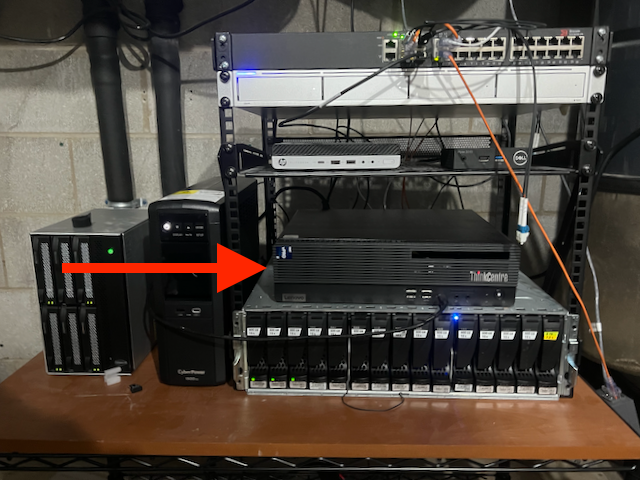
It was, as covered earlier, a piece of shit.
I'm still not quite sure what was wrong, but it was never reliable. Often it would just not come up after a reboot. Once in a while it would just forget about hardware.
On more than one occasion I or my spouse would discover that Jellyfin wouldn't play anything anymore, and I would shuffle down to the basement to attach a monitor and keyboard and discover that the entire storage disk shelf was errored out with inscrutable SAS adapter driver errors in the kernel logs.
Around the time I wrote the previous piece I put together a likely story. The eBay seller knew this machine was bad but they slapped an "eBay Certified Refurbished" label on anyway and sold it for a song to a sucker. By the time I realized this I had modified the machine so extensively I couldn't make a refund claim.
The Problem of Kubernetes
Simultaneous to the nibbler revelations I had another realization: Kubernetes is Too Hard.
I built a system that I didn't actually know how to maintain without the time or energy necessary to dig myself out of trouble.
When the machine that has more cores and memory than every other machine in the cluster combined decides to self-immolate once or twice a week it puts a huge damper on the whole experiment.
My stop-gap solution was to revert everything important back to the way things were before k8s, which was effectively just docker compose. After letting that bake for a while I decided to just roll with it.
You Know What They Say About Temporary Solutions
It's now July of 2026.
lrrr exists in much the same form as it did before.
It's still running Proxmox, but the only virtual things there are one LXC running Omada and one tiny VM that I've been using to ease myself into the agentic lifestyle.
I've also done the worst thing imaginable to the Proxmox forum trolls: I've installed Docker on the host to run core services like Home Assistant and friends.
hypnotoad and crushinator are turned off, lying in state until I need them again.
morbo is a new-to-me HP Elitedesk 800 G3 SFF that runs TrueNAS SCALE and whose entire job is to manage storage and stay out of the way and it does a great job. The end.
ord-router is a VM running at a datacenter in Chicago that happens to have direct peering with Comcast. This is the public ingress node.
nibbler is now an amalgamation of old and new parts: same memory, same storage, new gamer-style case and motherboard and processor (Ryzen 9 9900X). It also recently gained an RTX 5060ti 16GB video card for local LLM experiments.
This is the "everything else" machine. Everything that isn't critical to the house functioning as a house and the network as a network runs here.
Among other things, nibbler is where Forgejo, Minecraft, and Jellyfin and friends live, along with a bunch of other random crap.
There are also a handful of Raspberry Pi-class devices scattered around that are also deployed with this system, but they do appliance-type things: house-pi runs a Z-Wave stick and shed-pi is where the ADS-B receivers are plugged in.
Docker Compose with Extra Steps
Quirky? Yeah, let's go with quirky.
The software stack that deploys the homelab is arranged like this:
- a bunch of spicy docker compose stacks
- a handful of Ruby libraries that implement the spice
- a Rakefile to drive the libraries
- a YAML file that ties it all together
What's the spice, you ask?
- cron jobs
- secrets management
- secure defaults
- http ingress via Caddy with optional authn/authz and optional public-facing IP
- automatic certificate management via Lego
- backups
- monitoring
- dashboard
- static websites served by the ingress
- cross-stack dependency declarations
- cross-platform docker image builds
Each compose stack declares what it wants using compose extensions (i.e. fields that start with x-).
Here's a simple example:
services:
  metube:
    image: ghcr.io/alexta69/metube
    container_name: metube
    hostname: metube
    restart: unless-stopped
    x-security:
      enabled: true
    volumes:
      - media-nfs:/media
    environment:
      DOWNLOAD_DIR: /media/youtube
      HOST: '::'
    x-backup:
      enabled: false
    x-web:
      port: 8081
      auth: true
      dashboard:
        name: MeTube
        subtitle: Download YouTube Videos
        category: Media and Games

x-depends:
  - media-volume
This sets up MeTube, a little app that grabs videos from various places around the internet.
It enables the secure defaults, it declares that it doesn't need backups, and then it sets up ingress.
Here, x-web specifies the port, that it wants authentication/authorization, and that it should show up on the dashboard.
This example also illustrates the cross-stack dependencies.
It pulls in the media-volume stack which sets up the media-nfs volume.
The trick that lets all that work is that all of the stacks get smushed into one big docker-compose file at deploy time. That means I don't have to do gross things like declare external volumes or networks, it all just hangs together.
Networking Is Type Two Fun
In a normal docker compose world every container in a stack shares a bridge network. For my purposes that doesn't make sense. I don't want some random vibe-coded thing that I downloaded yesterday to be able to talk directly to lldap, for example.
Instead, I emulate what you'd get if you were deploying individual stacks: each stack gets a bridge network to itself, and containers in other stacks can join it when necessary.
The natural way to implement ingress, then, would be to have every container that serves a website join a shared ingress bridge. Again, though, that doesn't really fit what I'm going for. I want to preserve the separation between stacks so that an extruded todo list manager that gets popped doesn't threaten everything else.
My solution is deterministic IPv6:
- The fleet as a whole gets a /48 IPv6 ULA, which is similar in concept to an RFC1918 IPv4 network (ex:
10.10.10.0/24) but drawn from a vastly larger pool - Each host gets a /64 by hashing the hostname + salt for the next 16 bits
- Each stack gets a /96 by hashing the stack name + salt for the next 32 bits
- Each service gets a /128 by hashing the container name + salt for the last 32 bits
In other words:
<48 bit ULA prefix>:<16 bit host>:<32 bit stack>:<32 bit service>
Caddy runs with network_mode: host and all of the generated upstreams point at the IPv6 assigned to the containers, which works because the host naturally has access to all of the bridges.
Another weird/brave/stupid thing about my setup is that lrrr and nibbler both have ports 80 and 443 exposed to the internet over IPv6.
Caddy is set up to reject non-local traffic unless the service specifically opts in with a public: true route.
This is mostly for convenience so I don't have to set up Tailscale on mobile devices to access things like Jellyfin and the dashboard.
Oh, and Tailscale. Tailscale is so cool. Except on my iPhone which it makes very hot and drains the battery.
Tailscale is the backhaul for a few important things.
Web traffic that hits ord-router is routed to the hosts in the basement over Tailscale.
It's also how Caddy on each host talks to the central authn/authz system running on lrrr.
What Have We Learned Today
First, that I have not built a Kubernetes. Nothing about this changes at runtime so I don't need etcd or Raft or consensus of any sort. Everything is statically determined up front, with linters and tests and other nice things.
Second, the failure domains concept actually works really well in practice.
lrrr is home for critical stuff which is kept to a minimum.
nibbler is everything else that isn't a weird one-off appliance.
If nibbler goes down people are sad but not mad.
If lrrr goes down the HVAC system gets a little dumber and the LEDs we rely on to tell us the cats are outside stop working.
Finally, it's really nice to have full control over the system. For example, the other day I decided to implement that static sites via ingress thing. I didn't have to dig for a solution on some kubernetes discourse that is five years out of date and then translate it forward. I just wrote some code and made it happen. Same with the IPv6 thing. Being able to do that smoothly is a consequence of having complete control.
Oh, and also, if none of this sounds like type one fun for you then sticking with Kubernetes or one of the zillion docker compose managers that people have put together is completely valid. I see you. It's ok.
I have a sanitized public snapshot of the code that builds the whole thing on my Forgejo if you're interested.
Wanna chat about this kind of thing? Links to my socials etc are in the footer.
It's 2026 so I guess this needs to be explicit: these are artisanal, human-produced words. The machines suggested fixes for my hackneyed clichés but I didn't use any of their words.
Homelab Failure Domains
Everything is in shambles.
One machine is dead and probably not coming back. Services are randomly scattered amongst the survivors. My Kubernetes project is kinda-sorta paused.
I'm unnerved and want to get it all sorted out, but I need to do some thinking out loud first.
My infrastructure currently consists of:
-
Omicron, a Kubernetes cluster that is just barely functioning. It is currently running this site, VMSave, and basically nothing else. Consists of
hypnotoad,crushinator, and a control plane VM running on a Wyse 5070 running Proxmox. -
Nimbus, a Kubernetes cluster that is not functioning at all. I tried building out a GitOps-driven cluster as my second attempt and everything was going swimmingly until
nibbler, a historically unreliable piece of hardware that when it works has more cores and memory that the rest of my infra combined, fell over again in yet another inexplicable way. -
Lrrr, a box with an Intel N150 and 32GB of memory running a VM on top of Proxmox that is hosting almost everything that was previously on the two Kubernetes clusters.
This jumbled state of affairs is basically due to a series of impulsive hardware purchases and "oh that's neat, let's do that" infrastructure changes.
Let's talk about failure domains.
I think of a failure domain as a set of risks and mitigation strategies as applied to a particular instance of a service.
The canonical example in the software-as-a-service world is "production", i.e. the instance of the service that the customers touch. The one that makes the money. The primary risk is the money going away if the service goes down.
A SaaS shop may have a staging environment, where changes get tested before they hit production. The main risk in staging is inconveniencing your coworkers, but the consequences of that to the company are much less impactful.
Each developer in then hopefully has one or more of their own environments in which to actually make the software. These are practically risk free to the company as a whole, only inconveniencing one developer if something goes awry.
Overcomplicated home infrastructure doesn't map neatly into the same failure domains as a SaaS business, of course, but they still exist.
When I think about the users of the services in my home I imagine a sort of abstract "household delight" score. Points accrue implicitly when things are running fine and people are able to use the things I'm trying to provide. Points get deducted when they notice things aren't working or when they see me stomping around grumbling about full hard drives and boot errors.
By that logic I have three different failure domains (actually four but we'll get to that):
-
Critical production. The absence of service would be immediately noticed and commented upon, often affecting the comfort of the occupants of the house. Examples: network, DNS, Home Assistant and friends, IoT coordinators.
-
Production: The absence of service would be noticed eventually but even an extended outage wouldn't cause hardship. Examples: Jellyfin, Sonarr and friends, paperless-ngx.
-
Lab: I'm the only one affected by things breaking in the lab. A playground for testing and fucking around.
The fourth failure domain that doesn't neatly map into the above is production services for external users. VMSave and this site are the big ones but there are a few smaller things too.
When I'm brutally honest with myself I have to recognize that the biggest common source of failure in every domain is me. Trying things, adding hardware, replacing software, messing around, testing in production.
Often my partner will remark "I don't understand how things just fail!" They usually don't. Failure is an immediate or delayed result of me changing something without considering the impact.
So. What to do.
Obviously first I need to delineate the lab from everything else. Separate hardware for sure, maybe even hide it all behind another router and subnet.
For production, one plan would be to just put everything critical and production on the one docker VM and let it be. The machine isn't struggling overall but Jellyfin isn't super great because the N150 doesn't quite have the oomph necessary to transcode some of the stuff we have in real time.
Another plan would be to split them onto two machines running docker VMs. This would reduce the churn on critical production and reduce the chances of a change messing things up.
Yet another plan would be to spin up a separate Kubernetes cluster for each, moving right along the overcomplicated continuum.
The thing is, Kubernetes makes sense to me now that I've worked with it in anger a little. I really think for my application it makes sense, and the problems with Nimbus come down to nibbler being flaky and k8s trying to self-heal without enough resources available.
I don't know what to do about external production. My intent was to have it at home out of principle (or maybe out of spite) but it would probably be better to have it in an isolated cloud environment.
The one Docker VM is working ok, but it's mixing failure domains which makes me uncomfortable. For now, things are how they are and I can't let myself worry about it too much.
Links in the footer if you have comments or ideas. I'd love to hear them.
Kubernetes at the (homelab) Edge
As I've mentioned before, the RF environment in my house is difficult. The house layout is roughly:
- single level house, half of which has a basement under it
- single level office / mother-in-law-suite / ADU / whatever you want it
- two car garage in between
- shed in the back yard
The house and ADU are built out of cinder block and brick on the outside and plasterboard (not drywall) on the inside with foil-backed insulation sandwiched in between. The garage is built in between the two buildings, half with the same cinder block and brick construction and half with more modern stick construction.
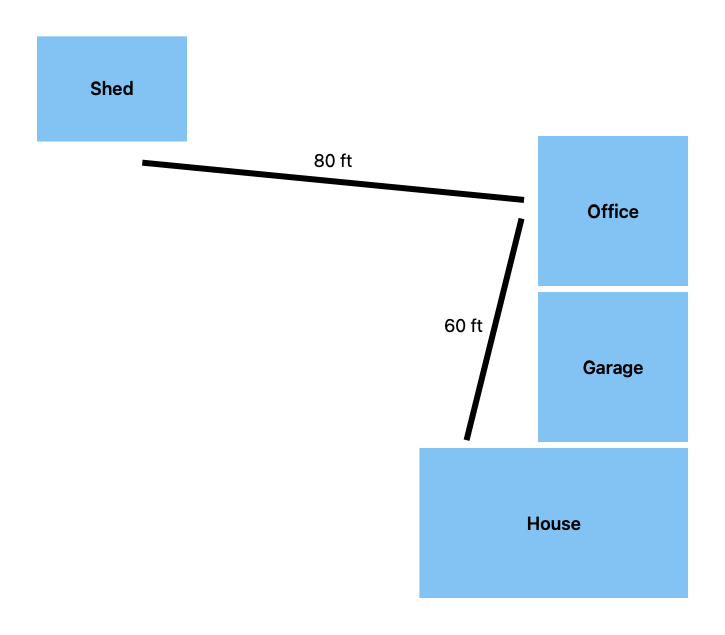
These buildings were built in the 1950s when labor was cheap, longevity was valued, and AM radio stations were extremely powerful.
The shed is just an ordinary stick and OSB sheathing shed, but it's quite a distance from the house proper.
I consider the three buildings and the garage as separate "RF zones", for lack of a better word. Zigbee and Wi-Fi at 2.4GHz and Wi-Fi 5 at 5GHz do not propagate through the block and foil very well or at all. Z-Wave (900MHz) has a slightly better time but because the house is so spread out and Z-Wave has a fairly low hop limit for mesh packets (4 hops, vs at least 15 for Zigbee) repeaters don't work very well. Lutron Caseta (434MHz) has phenomenal range and penetrates the foil with zero issues, but the device variety is severely limited. In particular, there are no Caseta smart locks.
Each zone has:
- At least one Wi-Fi access point
- A Z-Wave hub
- (sometimes) a Zigbee hub
- (sometimes) RS232 or RS485 to USB converters for equipment like our generator and furnace
Previous Solutions
The Z-Wave and Zigbee "hubs" are mostly just USB sticks stuck into a free port on a Dell Wyse 3040 thin client. I've had these little machines running for almost five years through a few different setups.
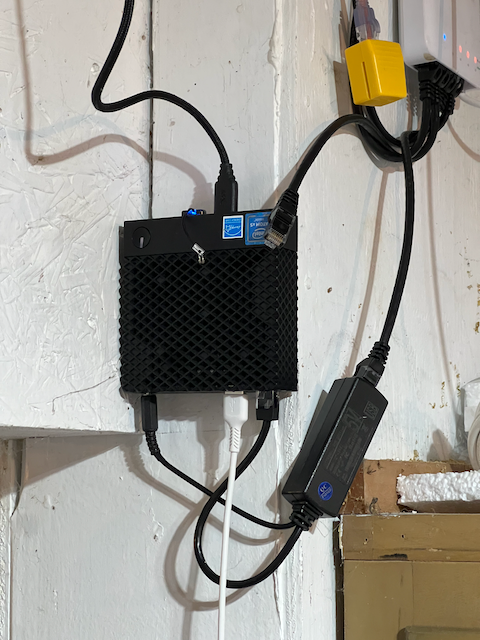
First, I had ser2net running over Tailscale and had the gateway software, i.e. zwave-js-ui and zigbee2mqtt, running on a server in my house.
This was fine, until I had some significant clock skew when a node rebooted (i.e. the CMOS battery was dead and the hunk of junk thought it was 2016) and Tailscale refused to start because it thought the SSL certificate for the Tailscale control plane wasn't valid.
The second draft was to just run the gateway software directly on the 3040s. This actually works fine. The 3040s are capable machines, roughly comparable to a Raspberry Pi 4, so they could run a little javascript program just fine. It was somewhat less responsive than running the gateway on the server, though.
The third version of this is to use a hardware gateway. I'm currently using one for Zigbee because the location of the house zone's 3040 is not ideal for some important Zigbee devices and they lose connection a lot. I positioned the hardware gateway in a spot that has good Wi-Fi coverage but no Ethernet port and now those devices are rock solid.
But what if Kubernetes?
While rolling out Kubernetes I didn't really plan on converting the 3040s because running the gateway software on them was working fine. Just as an experiment I attempted to install Talos on one of my spares. Amazingly, it worked great after making one tweak to the install image. The 3040s are very particular about certain things and they, like many of the SBCs that Talos supports, don't like the swanky console dashboard. After turning that off the machine came right up as a Kubernetes node in the cluster.
At idle the Kubernetes workloads plus my cluster's standard DaemonSet pods use about 40% of the machine's 2GiB of memory and roughly 30% of CPU.
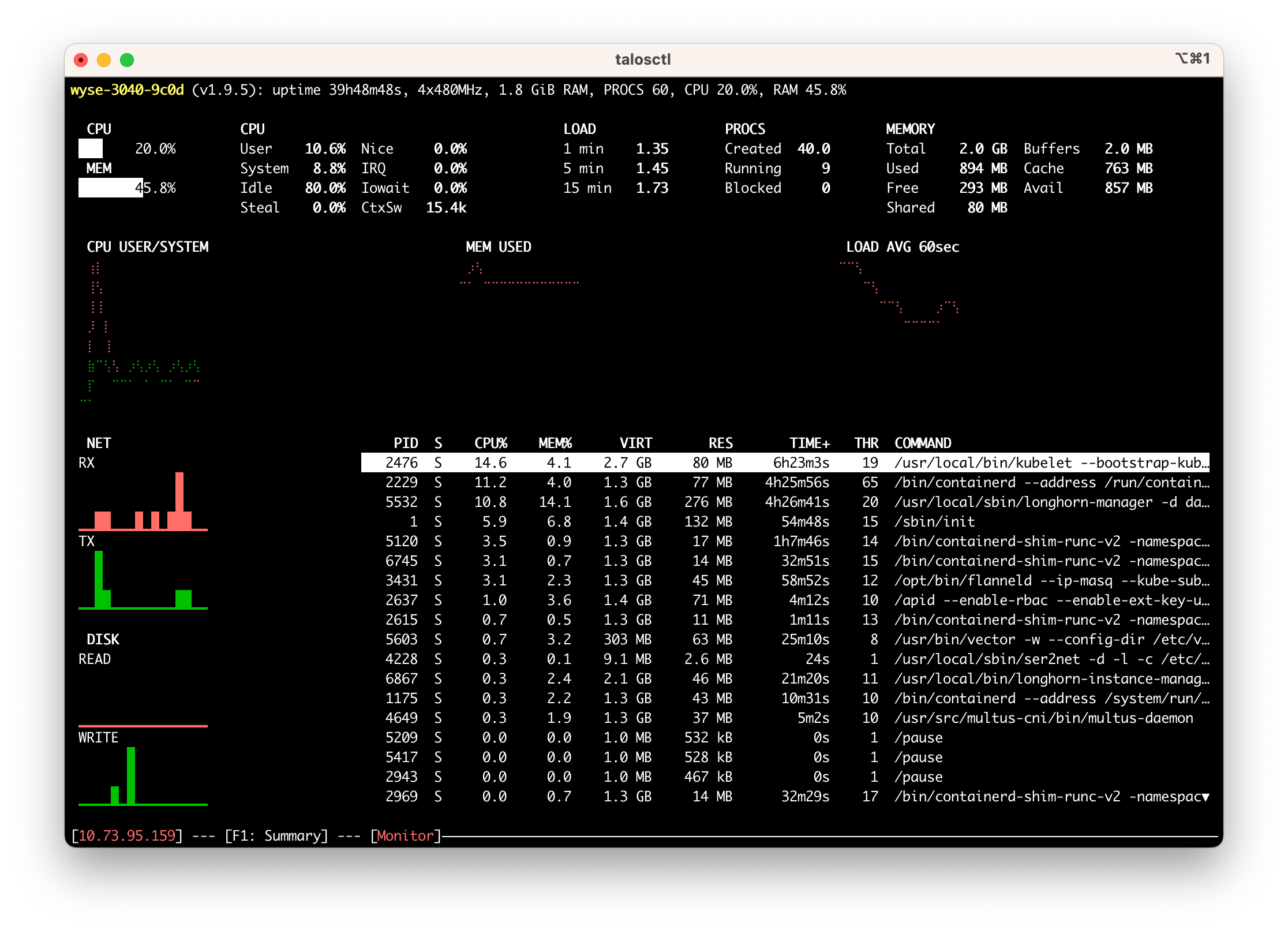
That leaves way more than enough to run ser2net.
Automatic ser2net Config
I initially thought that I would use Akri to spawn ser2net. Akri is a project that came out of Microsoft that acts as a generic device plugin for Kubernetes as well as managing what they call "brokers", which are just programs that attach to whatever device and provide it to the cluster.
That sounded perfect for my purposes so I set it up and let it bake for a few days. It did not go well.
The big problem is that Akri is just not very stable. Things were randomly falling over in such a way that the Akri-managed Z-Wave ser2net brokers would crash loop overnight. I made no debugging progress so I started on my fallback idea: automatically managing a ser2net config.
Realistically, my needs are simple:
- I want to present one or more serial devices to the network.
- I want this to be reliable.
- I want this to be secure.
- I don't want to micromanage it.
It turns out, discovering USB serial devices on linux is actually pretty trivial. You just have to follow a bunch of symlinks.
This shell script is based on logic found in the go-serial project:
set -e
set -x

# Find all of the TTYs with names we might be interested in
ttys=$(ls /sys/class/tty | egrep '(ttyS|ttyHS|ttyUSB|ttyACM|ttyAMA|rfcomm|ttyO|ttymxc)[0-9]{1,3}')

for tty in $ttys; do
    # follow the symlink to find the real device
    realDevice=$(readlink -f /sys/class/tty/$tty/device)

    # what subsystem is it?
    subsystem=$(basename $(readlink -f $realDevice/subsystem))

    # locate the directory where the usb information is
    usbdir=""
    if [ "$subsystem" = "usb-serial" ]; then
        # usb-serial is two levels up from the tty
        usbdir=$(dirname $(dirname $realDevice))
    elif [ "$subsystem" = "usb" ]; then
        # regular usb is one level up from the tty
        usbdir=$(dirname $realDevice)
    else
        # we don't care about this device
        continue
    fi

    # read the productId and vendorId attributes from the USB device
    productId=$(cat $usbdir/idProduct)
    vendorId=$(cat $usbdir/idVendor)

    snippetFile="$vendorId:$productId.yaml"

    if [ -f "$snippetFile" ]; then
        sed "s/DEVNODE/\/dev\/$tty/" $snippetFile
    fi
done
The last few lines of the loop body look for a YAML snippet available for the specific vendorId/productId pair.
If there is one, replace the constant DEVNODE with the actual device path and write it to stdout.
Here's what one of the snippets looks like:
# zigbee

connection: &zigbee
  accepter: tcp,6639
  connector: serialdev,DEVNODE,115200n81,local,dtr=off,rts=off
  options:
    kickolduser: true
This snippet tells ser2net to open a listening connection on TCP port 6639 and wire it to a serial device at path DEVNODE.
Use 115200n81 parity and keep the dtr and rts bits off (this is specific to the Sonoff zigbee stick I'm using).
Further, when a new connection opens immediately kick off the old one.
I drop the above script, the YAML snippets, and this simple entrypoint.sh script into a container image based on the standard ser2net container.
#!/bin/bash

set -e
set -x
set -o pipefail

echo "Generating ser2net.yaml"

mkdir -p /etc/ser2net
./discover.sh > /etc/ser2net/ser2net.yaml

echo "Running ser2net"

cat /etc/ser2net/ser2net.yaml

exec ser2net -d -l -c /etc/ser2net/ser2net.yaml
I then deploy it to my cluster as a DaemonSet targeting nodes labeled with keen.land/serials=true:
apiVersion: apps/v1
kind: DaemonSet
metadata:
  name: ser2net
  namespace: iot-system
  labels:
    app: ser2net
spec:
  selector:
    matchLabels:
      app: ser2net
  template:
    metadata:
      labels:
        app: ser2net
    spec:
      nodeSelector:
        keen.land/serials: "true"
      volumes:
        - name: devices
          hostPath:
            path: /dev
      imagePullSecrets:
        - name: ghcr.io
      containers:
        - name: ser2net
          image: "ghcr.io/peterkeen/ser2net-auto:main"
          securityContext:
            privileged: true
          volumeMounts:
            - name: devices
              mountPath: /dev
      restartPolicy: Always
      hostNetwork: true
The interesting things here are that the pod is running in privileged mode on the host network.
I thought about using container ports but then I would have to somehow know what DaemonSet pod name mapped to which host.
With hostNetwork: true I don't have to think about that and can just use the host's name in my gateway configs.
There's an opportunity here to cook up a custom deployment type with something like Metacontroller, which I have installed in the cluster but as of yet haven't done anything with.
Pros and Cons
So all of this work and what do I have? Basically what I had when I started:
- ser2net on the devices with the serial ports
- gateway software running on a server
The big pro of this setup is that I have one consistent management interface. I can set up and tear down ser2net with the exact same interface I use to set up and tear down everything else in the cluster.
There are a couple of cons, too. First, this probably uses a touch more power than the old solution because in addition to ser2net the Wyse 3040s are running all of the Kubernetes infrastructure. These things use so little power as is that I don't think it really matters, but it's worth pointing out.
Second, there's more to go wrong. Before this I had Alpine running basically nothing except ser2net. The system was static in practice, meaning that there was very little that could break.
Now there are several components running all the time that could break with a bad upgrade and could require me to take a crash cart out to each machine.
This is also putting more stress on the drives. All of these machines are booting off of significantly overprovisioned high endurance SD cards now so that shouldn't be an issue, but it's still something to keep in mind. The nice thing is that they're entirely stateless so swapping the card and reinstalling should be a quick operation.
Ultimately I think this is a good move and I plan to continue down the path of making every non-laptop device run on Kubernetes with very few exceptions.
Switching to Kubernetes
And you may ask yourself, "How do I work this?"
And you may ask yourself, "Where is that large home server?"
Once upon a time I had a Mac mini. It was hooked up to the tv (because we only had the one) and it ran Plex. It was fine.
Later, my new spouse and I moved across the country into a house. I decided that I should get a server because I was going to be a big time consultant and I figured I would need a staging environment. A Dell T30 picked up on super sale arrived soon after.
The server sat, ignored, while we suffered through the first few years of one baby, then two babies.
Later, we moved to our forever house and I found Home Assistant. I picked up a Raspberry Pi 4. All was good.
Except it kind of sucked? A 1GB Pi 4 is pretty limited in what it can practically run. Home Assistant ran mostly ok but anything else was beyond it's capabilities. To eBay!
Oooh, shiny hardware
Over the past four years I've accumulated a modest menagerie of hardware:
- Hypnotoad, a HP 800 G3 mini
- Crushinator, a HP 800 G3 SFF
- Morbo, another HP 800 G3 SFF
- Lrrr, a Dell Wyse 5070 thin client
- Roberto, another Dell Wyse 5070
- Nibbler, a Lenovo M80S Gen 3 SFF
- Shed, another Dell Wyse 5070 (such a boring name)
- A pack of roving Dell Wyse 3040 thin clients
- The original Pi 4
The T30, sadly, imploded when I tried to install a video card and fried the motherboard. Its name was Kodos and it was a good box.
Software, take 1 through N
As I was acquiring hardware I was also acquiring software to run on it and developed a somewhat esoteric way of deploying that software. The first interesting version was a self-deploying Docker container. It would get passed the Docker socket and run compose, deciding on the fly what to deploy based on the hostname of the machine.
This was fine, but it proved too much for the 3040s which have fragile 8GB eMMC drives.
A later version moved the script to my laptop and used Ansible to push Docker compose files out to all the machines.
Fine. Fiddly, but fine.
Software, take N + 1
Xe Iaso is a person that I've been following online for years. Recently they went through a homelab transformation, where for Reasons they decided to switch away from NixOS. After trying various things, much to everyone's chagrin, they settled on Kubernetes running on Talos.
Talos seemed to be what I wanted: an immutable, hardened OS designed for one thing and one thing only: Kubernetes.
Much like Xe, I had resisted Kubernetes at home for a long time. Too complex. Too much overhead. Just too much.
Taking another look at that hardware list, though, I do actually have a somewhat Kubernetes-shaped problem. I want to treat my hardware as respected but mostly interchangeable pets.
My deployment script was sophisticated but had no ability to just put something somewhere else automatically. It was entirely static, so when something needed to move I would have to restore a backup to the new target and manually redeploy at least part of the world in order to get the ingress set up properly.
Kubernetes takes care of that stuff for me. I don't have to think about where any random workload runs and I don't have to think about migrating it somewhere else if the node falls over. DNS, SSL certificates, backups, it all just happens in the background.
What's it look like?
After a couple of weeks of futzing around and day dreaming I settled on this software stack:
- Kubernetes (obvo)
- Talos Linux driven by Talhelper
- Helm for off the shelf components, driven by Helmfile
- Longhorn for fast replicated storage
- 1Password Operator for secrets management
- Tailscale Operator for private ingress and a subnet router to poke at services and pods directly
- ingress-nginx for internal and external access to services
- MetalLB to give local services a stable virtual IP address
- cert-manager for automatic LetsEncrypt certificates for services
- external-dns to drive DNS updates for services
- Keel.sh for automatic image updates
- Reloader to reload deployments when linked secrets and configs update
- EMQX as the MQTT server for some of my IoT devices (mostly zigbee)
- CloudNative PG for PostgreSQL databases
The next thing to decide was how to divide up the hardware into control plane and worker nodes. Here's what I have so far:
- Three (3) control plane nodes: hypnotoad, crushinator, and lrrr
- Seven (7) local worker nodes: hypnotoad, crushinator, nibbler, shed, three Wyse 3040s hosting Z-Wave sticks
- One (1) cloud worker node
You might notice that several nodes are doing double duty.
Splitting the control plane off to dedicated nodes makes sense when you have a fleet of hundreds of machines in a data center. I don't have that.
A small VM running on Lrrr is the only dedicated control plane node. The only reason for that is because Lrrr also hosts my Unifi and Omada network controllers and I haven't worked up the gumption to move those from Proxmox LXCs to k8s workloads.
Hypnotoad, Crushinator, and Nibbler are general compute. Nibbler has an Nvidia Tesla P4 GPU, which is not particularly impressive but fun to play with. Both Hypnotoad and Nibbler have iGPUs capable of running many simultaneous Jellyfin streams. Crushinator is a VM taking up most of the host which is also serving as a backup NAS for non-media data.
Shed lives in the shed and is connected to a bunch of USB devices, including two SDR radios, a Z-Wave stick, and an RS232-to-USB adapter for the generator.
Morbo is running TrueNAS and has no connection to Kubernetes except that some stuff running in k8s uses NFS shares. It's also the backup target for Longhorn and the script I use to backup Talos' etcd database.
Self-hosting in the Cloud
Talos has a neat feature built in that they call KubeSpan. This is a Wireguard mesh network between all of the nodes in the cluster that uses a hosted discovery service to exchange public keys.
Essentially, you can flip a single option in your Talos configs and have all of your nodes meshed, with a bonus option to send all internal cluster traffic over the Wireguard interface. The discovery service never sees private data, just hashes. It's really cool.
I'm using KubeSpan to put one of my nodes on a VPS to get a public IP without exposing my home ISP connection directly. After initial setup I was able to change the firewall to block all inbound ports other than 80, 443, and the KubeSpan UDP port.
To actually serve public traffic I installed a separate instance of ingress-nginx that only runs on the cloud node. This instance is set up to directly expose the cloud node's public IP which gets picked up by external-dns automatically.
I'm still trying to decide if this single node is enough or if I should get really clever and use a proxy running on Fly to get a public anycast IP.
Ok, but what's running?
Learning how Kubernetes works has been great and this process filled in quite a few gaps in my understanding, but it probably wouldn't have been worth the effort without hosting something useful.
Currently I'm hosting a couple of external production workloads:
- this blog
- VMSave
- a handful of very small websites
I'm also running a bunch of homeprod services:
- Home Assistant
- Whisper and Piper, speech-to-text and text-to-speech tools and components of the Home Assistant voice pipeline
- four (4) instances of Z-Wave JS UI, one per RF "zone" (this house has wacky RF behavior)
- two (2) instances of Zigbee2MQTT, one in each RF zone that has Zigbee devices
- Genmon keeps tabs on our whole home standby generator
- A Minecraft server for me and my kids
- Paperless-ngx stores and indexes important documents
- Ultrafeeder puts the planes flying overhead on a map
- iCloudPD-web for effortless iCloud photo backups
- Jellyfin, an indexer and server for TV shows, movies and music
- Sonarr, Radarr, Prowlarr and SABnzbd form the core of our media acquisition system
- Jellyseerr makes requesting new media easy for the other people who live in the house
- Calibre Web Automated is an amazing tool that serves all of my eBooks to my Kobo eReader
- Ollama and Open Web UI for dinking around with local LLMs
- Homer to keep track of all of the above, set as my browser homepage
Left To Do
There are a few things left on the todo list. Roberto is hooked up to a webcam that watches my 3D printer and I haven't touched it yet because it is connected via Wi-Fi which Talos doesn't support at all.
I also haven't touched the raspberry pi, mostly for the same reason. The pi is serving as a gateway between a Wi-Fi SD card that lives in my CPAP machine and the rest of the network so that I can scrape the data off without having to pull the card or futz with my laptop's Wi-Fi every day.
The Wi-Fi SD card, you see, only exists as an access point. It cannot be put into a mode that connects to another network. The pi has a USB Wi-Fi adapter connected to the card's network and the built-in Wi-Fi connected to the home network with nginx in between serving as a proxy. I don't think this is something that I really want or need to move into k8s.
I want to set up some sort of central authn/authz system for the homeprod services. The current fashion seems to be Pocket ID but I haven't been able to get it working reliably.
I'm thinking about setting up a small ActivityPub server to play around with.
A photo viewer like Immich might be cool to set up.
Overkill?
Of course this is overkill. This could probably all live on a single Wyse 5070 with a couple big harddrives attached.
I think it's been worth it to use Kubernetes in anger. I'm really enjoying the ability to deploy whatever I want to the cluster without having to think about where it runs, where it stores data, etc.
I've also learned a ton and fixed a bunch of preconceived notions and it's already helped increase reliability in a few things that affect household acceptance in big ways.
Homeprod Management with Docker Compose
Recently I decided to change how I manage my homeprod environment (home production, i.e. the things that other people in my household rely on and tell me if they're down). I moved everything over to docker-compose stacks managed with a small(ish) shell script. Skip down a bit if you don't want backstory.
Z-Wave Controllers using Dell Wyse Thin Clients
About two years ago my family and I moved into our (hopefully) forever home. This house has an unfortunately large number of exterior doors and is situated on a main road, so we wanted to make sure that most of the doors are locked without having to patrol the doors before bedtime every night.
To that end, I put z-wave locks on every door and built out a z-wave network so they could be reached from my Home Assistant instance that shows their status on a nice tidy dashboard.